For a while I had k3s running in the lab because that felt like the “serious” thing to do. Spin up a Kubernetes cluster, deploy YAML, talk about nodes and pods. In practice I had a small number of services, a single operator, and a lot of overhead for not much benefit. Most of my time went into keeping the cluster happy instead of actually building things. For this stage of my homelab that did not make sense, so I ripped it back out and went back to something leaner. SSH, Ansible and a handful of VMs with clear roles.
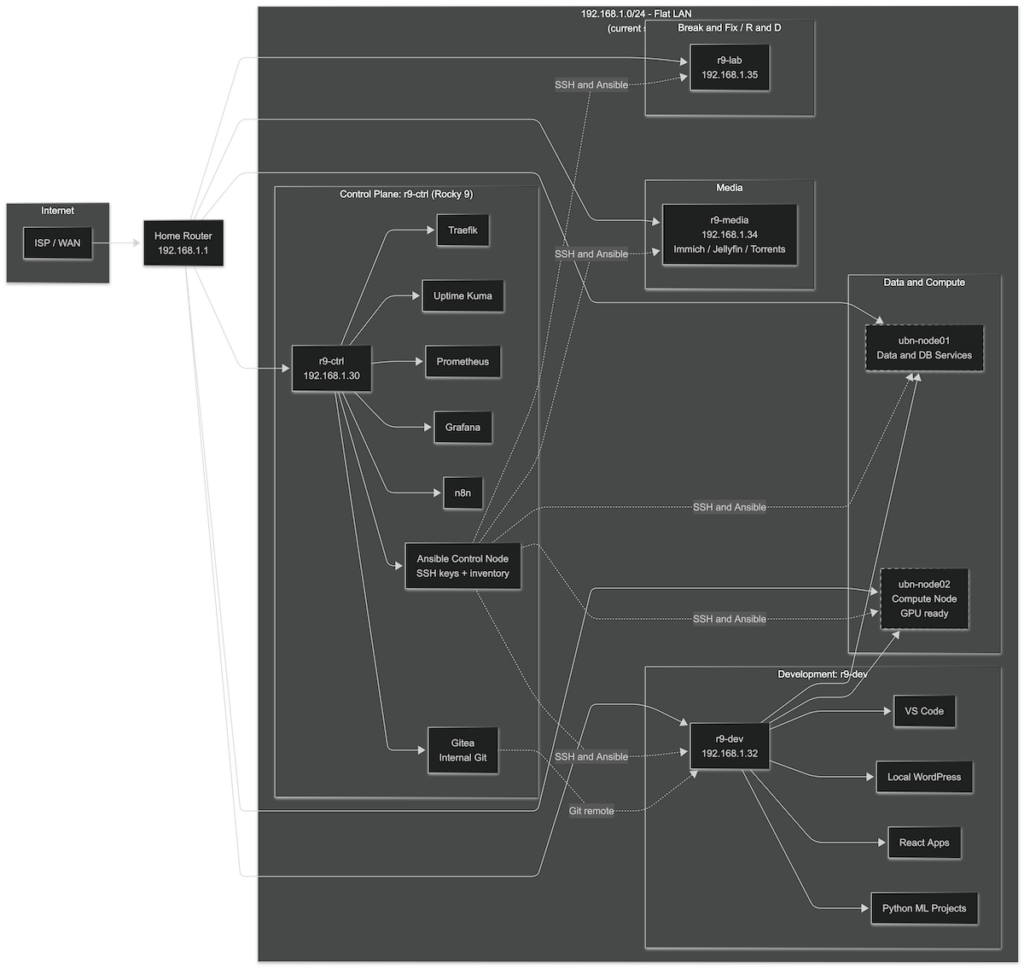
At the center of everything is r9-ctrl on 192.168.1.30. This is the control plane for the entire environment. It runs Rocky Linux and holds the Ansible repo, SSH keys and the inventory file that defines every other host. From here I can push configuration to the rest of the lab with a single command. r9-ctrl also runs the core management stack. Traefik handles reverse proxy and entry points. Uptime Kuma watches service health. Prometheus collects metrics and Grafana visualizes them. n8n runs the automation flows that glue together events and services. Gitea lives here as the internal Git server so all playbooks, infrastructure code and experiments can be version controlled inside the lab. Conceptually this VM is the brain. It knows where everything is, how it should be configured and how it should look from a monitoring point of view.
r9-dev on 192.168.1.32 is my development workstation in VM form. It is where I actually write code and push ideas forward. VS Code is the main editor and the box mirrors a real developer machine. I run Python projects here, especially anything related to machine learning. Current focus is on two areas. One is sports betting models that work on market odds and line movements. The other is sentiment driven workflows that take in news and text around stocks and markets and turn that into features and trading signals. On top of that r9-dev also runs local WordPress and React work. That lets me build or tweak web frontends, blog themes and small dashboards that talk to my services and models. It is the place where infrastructure meets application code.
The heavier backend work runs on the Ubuntu pair, ubn-node01 and ubn-node02. Both are Ubuntu VMs and together they form the data and compute layer for experiments. ubn-node01 is the data and services node. Databases, queues and anything with persistent state live there. It is the system of record for logs, historical odds, market data and any structured data I need for models and analytics. The physical host has a GPU but I do not pass it through to this VM, because its focus is on storage and reliability instead of raw compute. ubn-node02 is the processing node. It is where I run batch jobs, training and inference pipelines. NVIDIA drivers are installed and GPU passthrough is wired up, even though current datasets still fit on CPU easily. When models get heavier I can move to GPU without rebuilding the stack. The mental model is simple. Node01 holds the data and services. Node02 burns cycles.
r9-media on 192.168.1.34 stays out of all of that and focuses only on media. It runs Immich for photo management, Jellyfin for streaming, torrent tools for ingest and stores PDFs and other files. This keeps media noise away from the control and ML side. If a transcode job spikes CPU there, it does not affect my infrastructure control plane or training runs. It is basically a media appliance with a Proxmox birth certificate.
r9-lab on 192.168.1.35 is where I experiment and break things on purpose. It is the R and D and break or fix node. When I want to try aggressive Ansible changes, test new services, or see how something fails under pressure, it happens on r9-lab first. I treat it as disposable. That makes the rest of the environment safer, because I do not need to be timid with experiments. If something goes wrong I rebuild the lab VM and keep going.
All of these machines still sit on a flat 192.168.1.0/24 LAN behind the home router. That is intentional. A simple network keeps the mental load low while I finish shaping host roles and automation. Ansible is now the way configuration happens. I already use it to push shared packages, roll out the figlet based login banner into /etc/profile.d on every Linux box, and I can do system updates across all hosts from r9-ctrl in one go. For this size of environment that gives me more control and less drama than Kubernetes. I get idempotent configuration, a clean source of truth and easy rollback without needing a full container orchestrator.
The next phase is where networking becomes more advanced. Right now everything lives in one broadcast domain. When the base layout feels stable the plan is to introduce virtual Cisco router and switch images into the lab and start carving out proper VLANs. The control plane, dev and data nodes can move into an infrastructure network. Media can live in a more isolated segment. The break or fix node can sit at the edge or in its own experimental zone. At that point routing, firewall rules and maybe even automated network config join the picture. The same Ansible control node that configures VMs can start pushing changes to network devices, with Gitea holding the source of truth for both.
The philosophy under all of this is straightforward. Use the simplest stack that still delivers leverage. For me right now that looks like a solid Ansible control node with Gitea, a focused dev VM with VS Code, WordPress and React, a clean separation between data and compute, a media box that stays in its lane and a lab box for chaos. Kubernetes can come back when the workload justifies it. Until then this setup keeps me closer to the actual work.